Operating Room Recording
Capture surgical video from compatible OR imaging sources for daily documentation and review.

Surgical recorder / OR video capture
DM-RP4K1 is a 4K surgical video recorder for operating room recording, surgical teaching, case documentation, and post-case review. It combines HDMI 2.0 video workflow, a 7-inch touchscreen, H.264 recording, internal SSD storage, external USB backup, and optional FTP archiving.
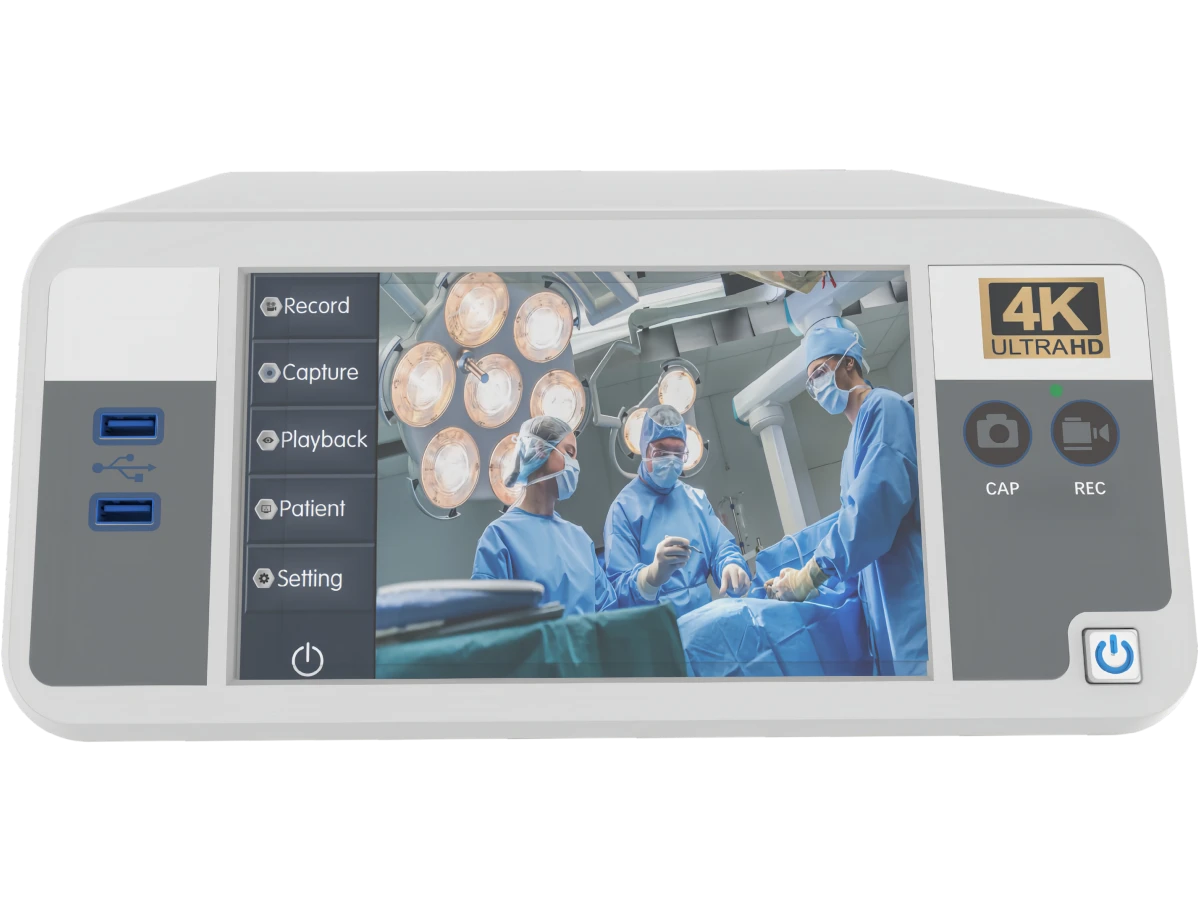
H.264 High Profile recording with MP4 / AVI format support.
Internal SSD recording plus external USB storage workflow.
Built for stable daily surgical video recording, teaching, documentation, and case review.
7-inch capacitive touchscreen with shortcut buttons helps clinical teams start recording quickly.
Internal SSD, USB storage, portable HDD, and FTP workflow support different department needs.
Why use a dedicated surgical recorder
In operating rooms, recording is not only about capturing video. The recorder must match the video source, resolution, storage policy, teaching workflow, and export method. DM-RP4K1 is positioned for hospitals, departments, distributors, and OR integration partners who need a practical 4K medical video recorder.
Applications
The recorder is suitable for clinical environments where a stable video source needs to be captured, stored, reviewed, exported, or shared for training and documentation.
Capture surgical video from compatible OR imaging sources for daily documentation and review.
Record procedures for teaching, training, academic discussion, and department review meetings.
Use recorded video files for post-case analysis, internal communication, and clinical documentation workflows.
Support integrators and distributors with HDMI workflow, storage confirmation, and project documentation.
Typical workflow
Connect the surgical imaging source and confirm resolution, frame rate, and preview workflow.
Start recording through the touchscreen or shortcut button, with configurable bitrate and segmentation.
Use internal SSD, external USB storage, portable HDD, or FTP network storage according to department policy.
Need to record two video sources?
DM-RP4K1 is designed for recording one 4K HDMI video source and provides an HDMI loop-out. If your workflow requires two 4K sources - for example, an endoscope together with a surgical field camera, or a microscope together with a room-view camera - choose the DM-RP4K2 4K Dual-Channel Surgical Video Recorder. It supports simultaneous recording of both channels or independent recording of Channel 1 or Channel 2.
Technical specifications
Use the following information for initial evaluation. Final configuration should be confirmed according to the video source, resolution, storage workflow, and tender requirements.
| Model | DM-RP4K1 |
|---|---|
| Video Input | HDMI 2.0 ×1 |
| Audio Input | Mic in / Line in |
| Monitor Output | HDMI 2.0 ×1 |
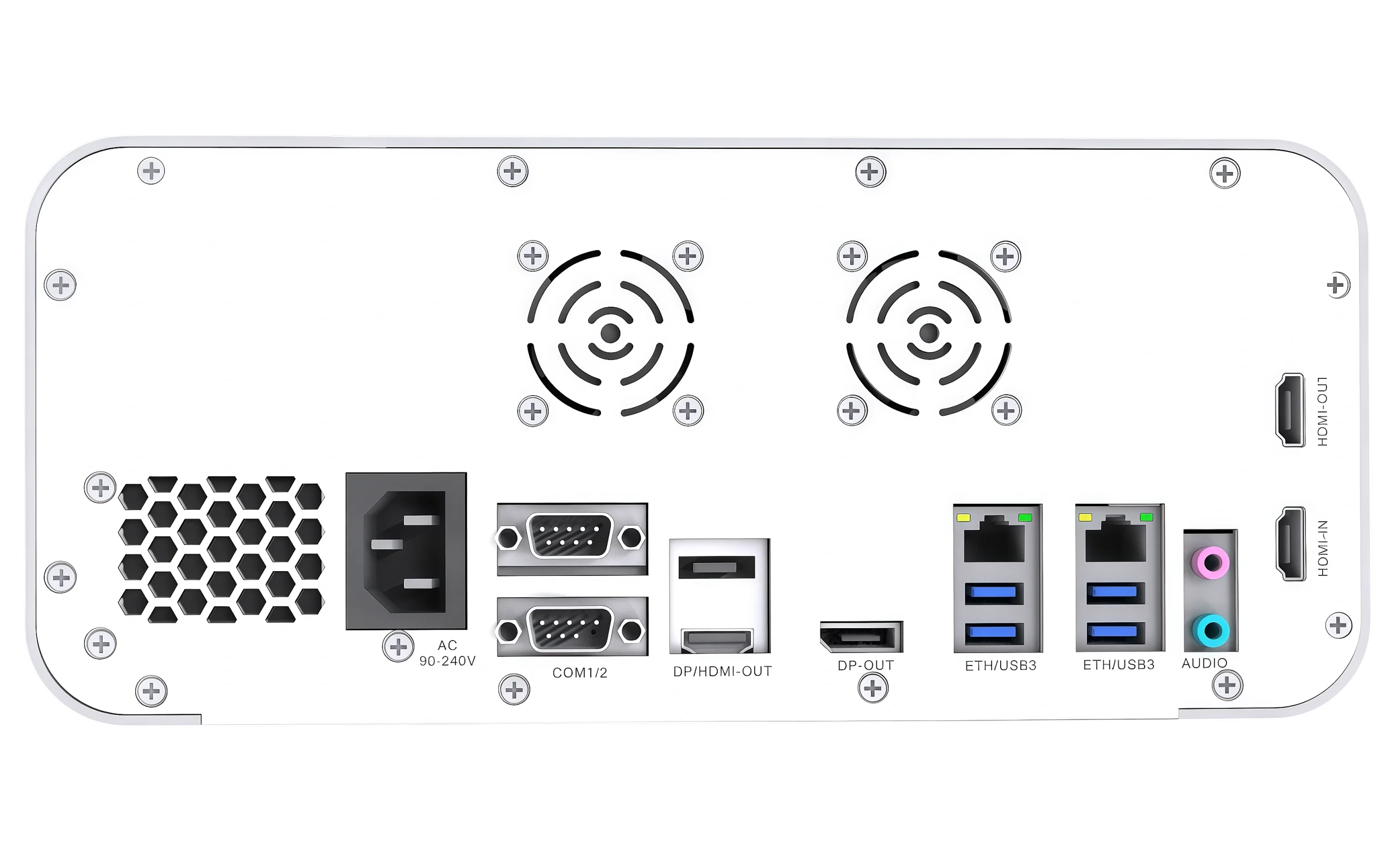
| HDMI Loop Out | HDMI 2.0 ×1 |
| Video Encoding | H.264 High Profile |
| Video Format | MP4, AVI |
| Photo Format | BMP, JPEG |
| Touchscreen | 7-inch capacitive touchscreen |
|---|---|
| USB Ports | Front ×2, rear ×4 |
| Network | RJ45 ×2, 10 / 100 / 1000M |
| Shortcut Buttons | Record, photo |
| Segment Recording | Supported, time configurable |
| Dual Storage | Internal SSD + external USB storage |
| Storage Devices | Internal SSD up to 2TB, USB disk, portable HDD, FTP storage server |
| Input Resolution | 3840×2160p@60; 1920×1080p@60 backward compatible |
|---|---|
| Record Resolution | 3840×2160p@60; 1920×1080p@60 backward compatible |
| Recording Bitrate | Configurable |
| Watermark | Supported |
| Preview Modes | Fast / slow / fullscreen preview |
| Video Editing | Supported |
| Power | AC 100–240V / 50–60Hz |
|---|---|
| Max Power | 80W max |
| Dimensions | 278 × 340 × 120 mm |
| Operating Temperature | 0°C to +40°C |
| Storage Temperature | -20°C to +60°C |
Note: Interface and storage workflow should be confirmed according to the final project BOM and hospital IT requirements.
Documents
For accurate evaluation, tell us your video source, target resolution, recording duration, storage policy, and whether the project requires department-level archiving or integration support.
FAQ
It is used for operating room video recording, teaching, documentation, case review, and project-based surgical video archiving workflows.
Yes. The standard configuration supports HDMI 2.0 video input, HDMI monitor output, and HDMI loop output. Final interface requirements should be confirmed according to the project configuration.
Yes. It supports internal SSD recording and external USB storage backup workflows, depending on the selected configuration and storage policy.
FTP network storage can be supported for centralized department archiving and IT-managed storage workflows.
Please share your country, video source interface, required resolution and frame rate, storage workflow, quantity, and any tender or integration requirements.
Get recorder information and quotation
For a practical quotation, please share your video source interface, required recording resolution, storage method, quantity, and project timeline.
Please include your country, organization, video source, required recording channels, and quantity.
We usually reply with configuration details, technical documents, and quotation guidance.